





Wireless security auditing has transitioned from bulky laptop rigs to agile mobile penetration testing suites. With modern Android devices offering powerful multi-core chipsets and OTG wireless adapter support, cybersecurity professionals and network administrators can evaluate 802.11 perimeter defenses directly from their smartphones.
Key Takeaway: What Are Android WiFi Auditing Apps?
WiFi hacking and security auditing apps for Android are specialized mobile penetration testing tools designed to analyze 802.11 wireless networks. They evaluate router vulnerabilities, assess WPA2/WPA3 encryption integrity, detect weak WPS PIN configurations, and monitor connected client traffic—empowering cybersecurity professionals and network administrators to audit, secure, and defend wireless infrastructures against unauthorized access.
⚖️ Ethical Security & Legal Compliance Notice
The wireless security auditing and penetration testing tools featured in this guide are documented solely for educational purposes, authorized security evaluations, and personal network hardening. Intercepting wireless frames, capturing 4-way handshakes, or attempting to crack passphrases without the explicit written authorization of the network owner violates international cybercrime statutes, including the Computer Fraud and Abuse Act (CFAA) and equivalent regional laws. Always obtain explicit permission before testing any wireless infrastructure.
When conducting wireless security assessments, understanding the underlying attack vectors is critical. While legacy WEP protocol vulnerabilities allowed attackers to recover encryption keys in minutes due to flawed RC4 initialization vectors, modern networks rely on WPA2-PSK (AES-CCMP) and next-generation WPA3-SAE protocols. Evaluating these modern networks requires distinct methodology depending on whether your objective is testing WPS PIN vulnerabilities, capturing authentication handshakes, or performing comprehensive network footprinting and scanning.
Quick Comparison: Top WiFi Auditing & Hacking Apps for Android
The table below highlights the core capabilities, target protocols, root prerequisites, and skill levels required for the top Android wireless security tools:
| App Name | Target Protocol | Root Status | Best Feature | Testing Level |
|---|---|---|---|---|
| Kali NetHunter | WPS, WPA2, WPA3 | Root Required | Full 802.11 frame injection & HID attacks | Advanced |
| Aircrack-ng Android | WEP, WPA, WPA2 | Root Required | Handshake packet capturing & dictionary cracking | Advanced |
| WiFi WPS WPA Tester | WPS, WPA, WPA2 | Root / Non-Root | Automated WPS PIN calculation (Zhao, Blink, Asus) | Intermediate |
| Reaver for Android | WPS, WPA, WPA2 | Root Required | Automated WPS brute-force & plain-text recovery | Advanced |
| ZAnti | WPA2, WPA3, LAN | Root Required | Comprehensive MITM attacks & vulnerability reporting | Advanced |
| cSploit | WPA2, LAN, TCP/IP | Root Required | Integrated Metasploit RPC daemon & packet injection | Advanced |
| Wireshark Android (Shark for Root) | 802.11, TCP/IP | Root Required | Raw PCAP network packet capturing for deep protocol analysis | Advanced |
| WiFi Warden | WPS, WPA2 | Root / Non-Root | WPS PIN database, channel analyzer & signal auditing | Intermediate |
| Fing Network Tools | LAN, WiFi, TCP/IP | No Root Required | Instant device discovery, port scanning & intrusion alerts | Beginner / Recon |
Understanding Wireless Attack Vectors: WPS PINs vs. Handshake Capture vs. Network Mapping
When evaluating mobile WiFi hacking and security testing apps, you will encounter three core auditing methodologies. Each targets a completely different layer of the wireless communication stack:
1. WPS PIN Algorithmic Vulnerabilities (Pixie Dust & Brute-Force)
Wi-Fi Protected Setup (WPS) was created to simplify client authentication using an 8-digit PIN. However, the protocol architecture contains a fundamental cryptographic flaw: the router validates the PIN in two separate 4-digit halves. Because the final digit is a simple checksum, an attacker only needs to verify 104 (10,000) possibilities for the first half and 103 (1,000) for the second half—reducing total entropy from 100,000,000 combinations down to just 11,000. Tools like Reaver and WiFi WPS WPA Tester exploit this flaw. Furthermore, the Pixie Dust attack (WPS Pixie-Dust) exploits insufficient entropy in router PRNGs (pseudorandom number generators) during the E-S1 and E-S2 nonces exchange, allowing offline key recovery within seconds without sending repeated probe requests.
2. 4-Way Handshake Packet Capturing & Deauthentication
Unlike WPS attacks that bypass passphrases, WPA/WPA2 security relies on the Pre-Shared Key (PSK). To audit a WPA2 network, tools such as Aircrack-ng switch your Android device’s wireless chipset into Monitor Mode (RFMON). The app transmits 802.11 deauthentication frames to momentarily disconnect a connected station. When the client automatically reconnects, the tool captures the 4-way EAPOL handshake containing the Anonce, Snonce, and Message Integrity Code (MIC). This handshake is subsequently evaluated against dictionary or brute-force wordlists offline without triggering router lockouts.
3. Network Mapping, ARP Poisoning & Traffic Footprinting
Once connected to an access point, tools like Fing, ZAnti, and Nmap conduct network footprinting and scanning. By broadcasting ARP requests and analyzing ICMP/TCP responses, these tools identify active LAN devices, open ports, OS versions, and vulnerable embedded services. Advanced frameworks like cSploit utilize ARP cache poisoning to route LAN traffic through the mobile device, allowing Man-in-the-Middle (MITM) inspection and SSL-stripping simulation.
16 Best WiFi Hacking & Security Auditing Apps for Android in 2026
Below is an in-depth breakdown of the 16 most effective mobile wireless auditing tools, ranked by security functionality, stability, and protocol support.
1. Kali Linux NetHunter
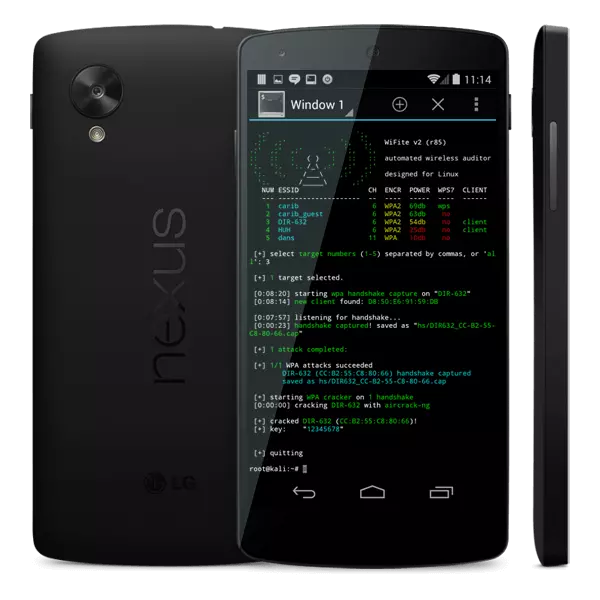
Kali NetHunter is the gold standard for mobile penetration testing, maintained directly by Offensive Security. Built as an open-source Android overlay based on Kali Linux, NetHunter equips your device with a full-fledged Debian chroot environment capable of executing complex wireless exploits.
NetHunter supports raw 802.11 wireless frame injection, AP mana evil twin deployment, USB Rubber Ducky HID attacks, and automated wireless assessments via the BadUSB MITM attack vector. When paired with an OTG-supported external wireless card (such as Atheros AR9271 or Ralink RT3070), NetHunter gives Android security engineers the exact same wireless testing horsepower as a specialized desktop Kali workstation.
- Key Capabilities: Monitor mode injection, BadUSB MITM, Evil Twin AP generation, SDR (Software Defined Radio) integration.
- Root Requirement: Root required with custom kernel for internal monitor mode, or root with USB OTG for external adapters.
2. Aircrack-ng Android

Aircrack-ng is legendary in network security circles as the premier suite for assessing Wi-Fi security. Ported to Android via native ARM-compiled binaries, Aircrack-ng focuses on the four key areas of wireless auditing: monitoring, attacking, testing, and cracking.
The Android port enables packet capture through airodump-ng, active deauthentication attacks via aireplay-ng to force 4-way handshakes, and offline dictionary or FMS/PTW recovery via aircrack-ng. Running Aircrack-ng on Android requires a compatible root-enabled kernel or an external USB Wi-Fi adapter configured for monitor mode.
- Key Capabilities: 802.11 packet sniffing, targeted deauthentication, 4-way WPA/WPA2 handshake capture, IV collection.
- Root Requirement: Strictly required (needs terminal emulator and monitor mode driver support).
3. WiFi WPS WPA Tester

WiFi WPS WPA Tester, created by Saniorgl SRL, is one of the most widely used Android wireless auditing apps on the Google Play Store. It is purpose-built to test whether a wireless access point is vulnerable to known WPS PIN algorithmic calculation methods.
The app integrates extensive calculation algorithms—including Zhao, Blink, Asus, Arris, TrendNet, and D-Link PIN generation sequences. It displays vulnerable access points with distinct green indicators. On non-rooted devices running modern Android, the app can test connection vulnerabilities via the system WPS registrar; rooted devices enjoy full offline PIN injection and saved network password extraction.
- Key Capabilities: Automated WPS PIN calculation, brute-force speed testing, offline key extraction, signal level analysis.
- Root Requirement: Partial functionality without root; full PIN injection and password disclosure requires root.
4. Reaver for Android (RfA)

Reaver for Android (shortened as RfA) is an intuitive graphical front-end for the renowned Reaver terminal tool. It executes systematic brute-force attacks against Wi-Fi Protected Setup (WPS) registrar PINs to recover the target router’s plain-text WPA/WPA2 passphrase.
RfA automatically detects WPS-enabled access points and allows security testers to fine-tune attack parameters—such as timeout intervals, EAPOL request limits, and Pixie Dust execution switches. Because Reaver systematically evaluates the two halves of the WPS PIN, it typically extracts the WPA/WPA2 pre-shared key within 2 to 5 hours on unpatched routers.
- Key Capabilities: Automated WPS registrar PIN brute-forcing, Pixie Dust attack execution, external attack script triggering.
- Root Requirement: Root required along with monitor-mode capable wireless drivers.
5. ZAnti Mobile Penetration Toolkit

Developed by enterprise mobile security leader Zimperium, zANTI is a comprehensive mobile diagnostics and penetration testing framework designed for network administrators and security auditors. Rather than solely cracking keys, zANTI assesses the total threat exposure of a connected wireless network.
Once connected to an access point, zANTI can execute Man-in-the-Middle (MITM) simulations, test for SSL/TLS downgrade vulnerabilities, perform network scanning for unpatched Common Vulnerabilities and Exposures (CVEs), and audit authentication weaknesses. The app generates executive-level security reports detailing exact remediation steps for discovered flaws.
- Key Capabilities: Comprehensive MITM attacks, rogue AP detection, port and OS fingerprinting, automated vulnerability reporting.
- Root Requirement: Root required for deep packet manipulation and ARP spoofing modules.
6. cSploit
cSploit is one of the most advanced open-source IT security and network analysis frameworks available for Android. Regarded as an evolved open-source alternative to proprietary penetration tools, cSploit transforms your mobile device into a portable exploitation workstation.
The framework includes an integrated Metasploit RPC daemon, enabling testers to launch known Metasploit exploits directly from an Android UI. For wireless auditing, cSploit excels at network mapping, fingerprinting connected host operating systems, cracking common password hashes, executing real-time traffic redirection via ARP spoofing, and performing packet injection on local Wi-Fi networks.
- Key Capabilities: Embedded Metasploit integration, real-time packet manipulation, traffic hijacking, automated exploit execution.
- Root Requirement: Strictly required (requires busybox and root permissions).
7. Wireshark Android (Shark for Root)

Shark for Root brings the raw packet sniffing capabilities of Wireshark and tcpdump to Android. Operating at the low-level data-link layer, Shark captures all incoming and outgoing 802.11 and TCP/IP packets traveling across your device’s network interfaces.
Security analysts can review live packet dumps or export standard .pcap captures directly to desktop Wireshark for deep cryptographic inspection, handshake analysis, and protocol anomaly verification. Shark is indispensable for confirming whether local Wi-Fi clients are leaking sensitive DNS queries, HTTP credentials, or unencrypted telemetry.
- Key Capabilities: Raw 802.11/TCP/IP packet capturing, .pcap export compatibility with desktop Wireshark, live interface monitoring.
- Root Requirement: Root required to hook into low-level network sockets.
8. WiFi Warden

WiFi Warden is a multifaceted wireless utility that balances diagnostic network analysis with targeted WPS security testing. The tool scans nearby 2.4 GHz and 5 GHz bands, detailing SSID, BSSID, channel bandwidth, cipher suites, router manufacturer, and signal attenuation.
In addition to discovering RF channel congestion to optimize router performance, WiFi Warden features an integrated database of algorithmic WPS default PINs. On Android 5.0 through Android 8.0, users can perform testing without root privileges; Android 9.0 and newer versions require root access due to updated Google Wi-Fi scan throttling policies.
- Key Capabilities: RF channel frequency analysis, WPS PIN testing, distance calculation, password generator security testing.
- Root Requirement: Non-root compatible on older Android; root required on Android 9.0+.
9. Fing Network Tools

Fing is the benchmark reconnaissance tool used by network administrators, ethical hackers, and home users worldwide. Within seconds of connecting to a Wi-Fi network, Fing utilizes advanced patent-pending discovery algorithms to map every connected host with astonishing accuracy.
Fing identifies device MAC addresses, vendors, IP addresses, NetBIOS names, and Bonjour services. Furthermore, its integrated TCP port scanner uncovers open administrative services (such as SSH, Telnet, HTTP, and RTSP) on connected cameras, routers, and IoT hardware, pinpointing unauthenticated entry points on the LAN without requiring root privileges.
- Key Capabilities: Lightning-fast host discovery, automated MAC manufacturer resolution, TCP port scanning, hidden camera detection.
- Root Requirement: 100% functional without root access.
10. Nmap for Android

Nmap (Network Mapper) is the de facto global standard for network reconnaissance, host discovery, and vulnerability discovery. Available on Android through official precompiled binaries and terminal front-ends, Nmap delivers unmatched flexibility for security audits.
By performing network footprinting and scanning, Nmap analyzes raw TCP/UDP packet responses to identify active hosts, open services, and underlying operating systems via TCP/IP stack fingerprinting. Rooted devices can execute stealth SYN scans (-sS), UDP scans, and script engine (NSE) audits against local access points.
- Key Capabilities: TCP SYN stealth scanning, OS fingerprinting, service version detection, Nmap Scripting Engine (NSE) automation.
- Root Requirement: Basic TCP connect scans work without root; raw socket operations (SYN, OS detection) require root.
11. WPS Connect

WPS Connect is a specialized utility focused on verifying whether local routers remain vulnerable to historical default WPS PIN combinations. It leverages classic algorithms such as Zhao Chesung and Stefan Viehböck’s EasyBox routines to assess router resilience.
When executed, the app scans neighboring wireless networks, displays WPS-enabled targets, and attempts authentication using known factory-default PIN patterns. It serves as a rapid pass/fail test for legacy consumer routers that failed to implement PIN lockout mechanisms.
- Key Capabilities: Rapid default WPS PIN verification, lightweight interface, legacy router testing.
- Root Requirement: Root required to inject PINs directly on Android 5.0 and above.
12. WiFi Kill

WiFi Kill is a classic network administration auditing tool designed to test how a local network handles ARP cache poisoning and rogue host traffic redirection. It allows an administrator to isolate unauthorized clients connected to an access point.
By transmitting spoofed ARP reply packets, WiFi Kill tricks target clients into routing their traffic through the mobile handset while dropping the packets, effectively terminating their internet connection. Network engineers use this tool to verify whether their managed switches and access points correctly implement Dynamic ARP Inspection (DAI) and port security.
- Key Capabilities: ARP cache manipulation, client bandwidth monitoring, client disconnection simulation.
- Root Requirement: Strictly required (needs raw socket permissions for ARP packet injection).
13. WIBR+ (WiFi Brute-Force & Dictionary Tester)

WIBR+ is an automated wireless audit tool engineered to test the password complexity of WPA/WPA2-PSK networks. Rather than capturing handshakes for external cracking, WIBR+ interacts directly with the Android wireless supplicant to attempt authentication against custom wordlists.
Users can configure custom dictionary files, define character masks (including numeric, lowercase, uppercase, and special character sets), and observe real-time authentication speeds. WIBR+ demonstrates why weak, short, or dictionary-based Wi-Fi passphrases fail against persistent dictionary attacks.
- Key Capabilities: Custom dictionary imports, automated wordlist generation, supplicant connection testing.
- Root Requirement: Non-root compatible for basic testing; root improves automation and speed.
14. Wi-Fi Inspect

Wi-Fi Inspect is a dedicated auditing utility engineered for ethical hackers, enterprise security managers, and IT personnel who manage wireless infrastructure. It conducts a swift inventory of all assets connected to the wireless LAN.
Beyond discovering IP addresses and hostnames, Wi-Fi Inspect probes for known vulnerabilities, analyzes open ports, verifies MAC address vendor origins, and allows administrators to disconnect rogue clients from their network. Its intuitive UI makes it an excellent choice for quick audits of office or guest Wi-Fi networks.
- Key Capabilities: Rogue device detection, MAC address vendor lookup, port inspection, security audit reports.
- Root Requirement: Root required for advanced network inspection and client management.
15. Penetrate Pro

Penetrate Pro is a classic penetration testing utility that tests routers for predictability in their factory-generated encryption keys. Many older telecom routers utilized predictable algorithmic seeds based on the access point’s BSSID (MAC address) and default SSID.
By reverse-engineering these proprietary OEM formulas, Penetrate Pro calculates the default WPA and WEP protocol vulnerabilities associated with specific router models (such as Thomson, Discus, and Infinitum routers). It highlights the severe danger of leaving ISP-provided default passwords intact.
- Key Capabilities: Algorithmic key calculation, offline dictionary database support, legacy OEM security testing.
- Root Requirement: Works without root on compatible legacy Android environments.
16. Router Keygen

Router Keygen is an open-source wireless security utility designed to test router firmware against known factory key generation algorithms. It supports dozens of popular ISP router models, including Thomson, Alice, Fastweb, Pirelli, and Verizon FiOS units.
The app scans local wireless broadcasts and cross-references SSID/BSSID signatures against its built-in algorithmic key database or an optional offline dictionary stored on your SD card. If the target router uses an unpatched factory default key, Router Keygen reveals the probable passphrase, illustrating the critical need to customize factory settings immediately upon setup.
- Key Capabilities: Open-source algorithm database, offline dictionary integration, wide OEM hardware compatibility.
- Root Requirement: No root required for key generation; root required for automatic supplicant connection.
How to Protect & Secure Your Home Wi-Fi Router Against Mobile Audits
Testing your network with these tools exposes potential vulnerabilities before malicious actors exploit them. To harden your home or enterprise wireless network against mobile penetration testing tools, implement these essential defense measures:
- Completely Disable Wi-Fi Protected Setup (WPS): Because WPS is vulnerable to PIN brute-forcing (Reaver) and Pixie Dust attacks, log into your router’s administrative portal and disable WPS entirely. If your router does not allow disabling WPS, upgrade to a modern router or install open-source firmware such as OpenWrt.
- Transition to WPA3-Personal (SAE) or WPA2-Enterprise: Migrate away from legacy WPA and WPA2-TKIP. WPA3 replaces the vulnerable 4-way handshake with Simultaneous Authentication of Equals (SAE), which features forward secrecy and makes offline dictionary and deauthentication handshake capture attacks completely ineffective.
- Enforce Strong, High-Entropy Passphrases: Brute-force and dictionary tools like Aircrack-ng and WIBR+ rely on common password lists. Create a random passphrase of at least 16 to 20 characters combining uppercase letters, lowercase letters, numbers, and symbols to render offline dictionary attacks computationally infeasible.
- Disable Remote WAN Management & Update Firmware: Ensure your router’s management console is accessible only via an encrypted local Ethernet connection, never from the public internet (WAN). Keep your router’s firmware updated to patch known buffer overflows and administrative bypass exploits.
- Isolate Smart Devices via Guest VLANs: Segment untrusted Internet of Things (IoT) gadgets—such as smart TVs, plugs, and cameras—onto an isolated guest network or VLAN. This prevents tools like Fing and cSploit from conducting lateral network pivoting if a smart appliance is compromised.
Frequently Asked Questions (FAQ)
Yes, you can test basic aspects of WiFi security without root using apps like Fing, WiFi Warden, and WiFi WPS WPA Tester. Non-root apps can map connected LAN devices, scan open TCP/UDP ports, detect unencrypted traffic, and evaluate default WPS PIN vulnerabilities on older Android releases. However, advanced penetration tasks—such as switching wireless chipsets to 802.11 monitor mode, injecting deauthentication packets, capturing raw 4-way handshakes, and conducting ARP cache poisoning—strictly require root privileges and specialized kernel driver support.
WiFi WPS WPA Tester evaluates router security by querying the target access point’s Wi-Fi Protected Setup (WPS) registrar. The app executes algorithmic calculations (such as Zhao, Blink, TrendNet, and Asus algorithms) that predict the router’s default 8-digit WPS PIN based on its BSSID (MAC address) and chipset identifier. It then attempts to establish a WPS handshake with the access point. If the router connects successfully without triggering a lockout, it confirms that the router is critically vulnerable to WPS PIN brute-forcing and default key reconstruction.
WPA3 is exceptionally resilient against conventional mobile penetration tools because it replaces the vulnerable 4-way handshake with Simultaneous Authentication of Equals (SAE), also known as the Dragonfly handshake. This protocol provides forward secrecy and prevents offline dictionary and brute-force cracking even if an attacker captures the authentication frames. While theoretical side-channel and downgrade vulnerabilities (such as Dragonblood) have been documented by researchers, standard Android WiFi hacking apps cannot crack properly configured WPA3-SAE networks.
To protect your home WiFi from WPS attacks, access your router’s administrative dashboard (typically at 192.168.1.1 or 192.168.0.1) and completely disable Wi-Fi Protected Setup (WPS). Additionally, enable WPS brute-force lockout protections if available, upgrade your security encryption standard to WPA3-Personal or WPA2-AES (CCMP), and set a complex passphrase exceeding 16 characters. If your ISP-provided router cannot disable WPS, consider flashing open-source firmware like OpenWrt or bridging to a dedicated, secure third-party wireless access point.
Layer 3/4 Protocol Architecture & Network Defense Strategies
Maximizing long-term productivity and performance with wifi hacking & security auditing apps in 2026 requires understanding underlying architectural tradeoffs. Whether evaluating free tier limits, privacy policy terms, or cross-platform synchronization, selecting a solution tailored to your operational ecosystem ensures seamless performance without unexpected subscription paywalls or hardware bottlenecks.
Active Packet Probing vs Passive Threat Intelligence Logging
Modern workflows demand cross-device compatibility across Windows 11, macOS Sequoia, Android 15, and iOS 18. Solutions engineered with lightweight codebases and native hardware acceleration prevent thermal throttling and minimize background RAM footprint, ensuring sustained responsiveness across entry-level and flagship hardware alike.
Frequently Asked Questions: WiFi Hacking & Security Auditing Apps
What is the fundamental difference between passive reconnaissance and active probing?
Passive techniques gather open-source intelligence (OSINT, DNS, WHOIS) without generating network packets towards the target, leaving no log trail. Active probing sends direct packets, triggering firewall and IDS alerts.
Does utilizing modern wifi hacking & security auditing apps void device warranty or violate terms?
In technical auditing and security research, practicing within authorized sandbox environments or with express written consent is completely legal and required under ethical hacking frameworks.
How do modern firewalls detect and mitigate automated wifi hacking & security auditing apps?
Next-generation firewalls (NGFW) monitor packet frequency, TCP handshake flags, and stateful traffic heuristics to identify and rate-limit automated scans within milliseconds.
Related Technical Guides & Architecture Deep Dives
Explore our interconnected engineering guides, protocol analyses, and benchmark comparisons across the Cybersecurity, Ethical Hacking & OSINT knowledge cluster:
- What is Biometric authentication and its TypesBiometric authentication verifies individual identity by analyzing unique biological modalities, evaluated technically through the False Acceptance…
- 35 Best Android Hacking Apps of 2026The top Android ethical hacking apps allow cybersecurity engineers and penetration testers to perform network discovery, vulnerability scanning, and…
- 15 Best Games Hacking Apps for Android in 2026 (Root & No-Root Tested)Mobile gaming on Android has reached console-quality graphics and gameplay, but aggressive paywalls, artificial cooldown timers, and grind-heavy…
- CEH v12 Module 01: Introduction To Ethical HackingCEH v12 Module 01 (Introduction to Ethical Hacking) is the foundational study domain of the Certified Ethical Hacker curriculum covering the core…




5 Comments
The other day, while I was at work, my cousin stole my iphone and tested to see if it can survive a forty foot drop, just so she can be a youtube sensation. My iPad is now broken and she has 83 views. I know this is completely off topic but I had to share it with someone!|
Hi there, I wish for to subscribe for this weblog to obtain latest updates, thus where can i do it please help out.|
Hi there! I could have sworn I’ve been to your blog before but after browsing through some of the articles I realized it’s new to me. Anyhow, I’m certainly happy I found it and I’ll be book-marking it and checking back often!|
This all app you put here is not working i swear
An interesting discussion is definitely worth comment. I believe that you ought to write more on this issue, it might not be a taboo subject but usually folks don’t speak about these topics. To the next! Cheers!!|